Bringing DataOps to Fabric’s Real-Time Capabilities
Over the past year, I have been working with Eventhouses to build analytic solutions that react to real-time events occurring in Fabric as well as monitoring third-party applications that can ship results to Event Streams.
If you’ve been following my blog for a while, you know that I’ve emphasized version control, testing (many are probably sick of me talking about testing), and orchestration (automated deployments). With that, I want to talk about the state of Fabric Real-time supporting version control and testing, key tenets to practicing DataOps. For the uninitiated, this includes Eventhouse (aka Azure Data Explorer), Event Streams, and Real-time Dashboards in Fabric.
I will caveat that I am new to Fabric Real-time and was surprised during my research that the underlying technology for Eventhouses (Azure Data Explorer and Kusto) turned 10 years old recently (so Power BI and Eventhouse are nearly the same age). However, I am not new to version control, testing, and orchestration, so my perspectives come from through the DataOps lens. Here are my thoughts:
Version Control
Eventhouses support Git Integration, which is a great start. Figure 1 shows an example of the .kql script that gets pushed to Git for the Eventhouse I have to support the series I have on Making Your Power BI Teams More Analytic. Can you guess what’s wrong with this from a version control perspective?
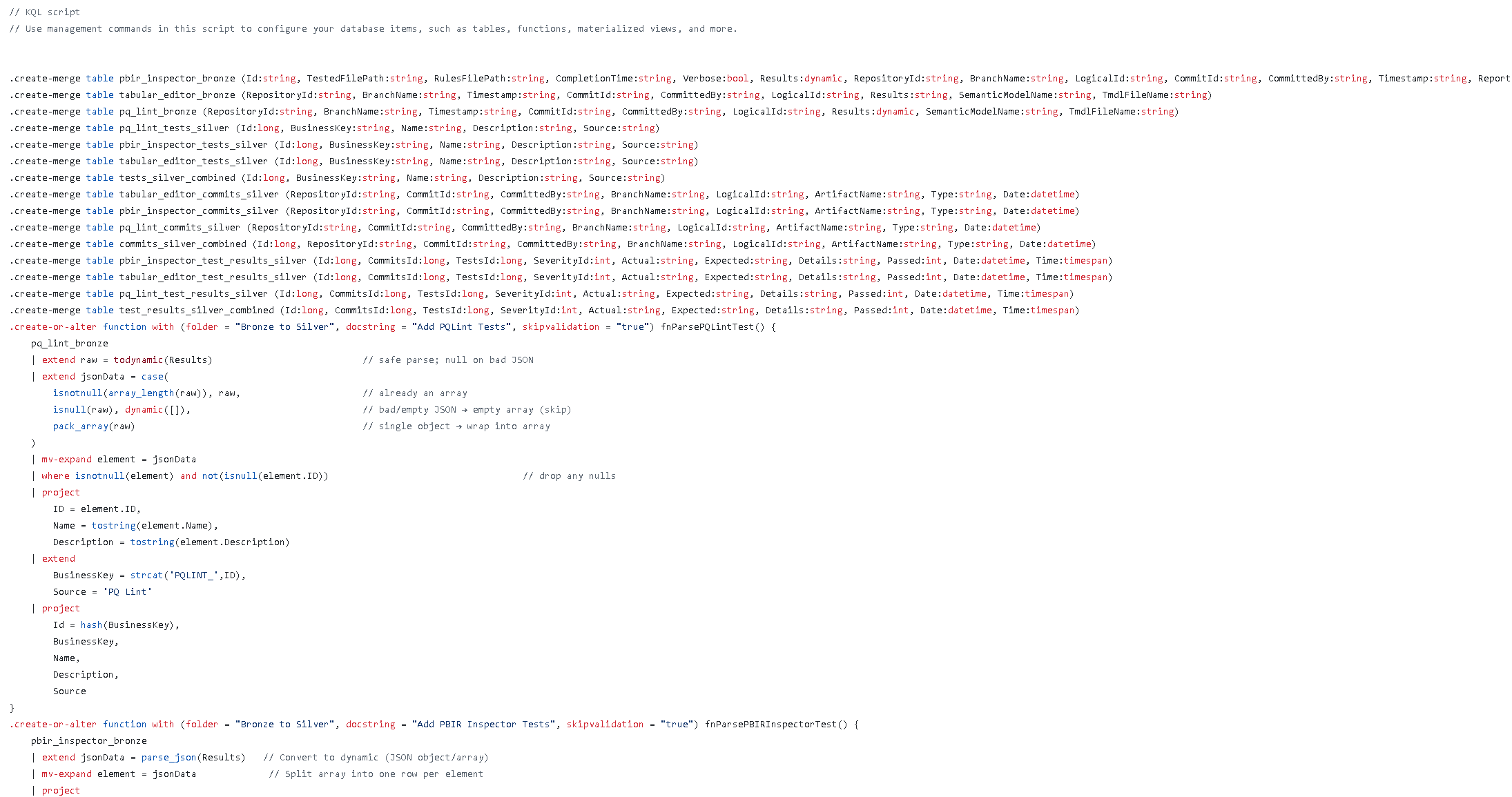 Figure 1: Eventhouse .kql script pushed to Git
It’s one large file and version control fares much better with separate files. When you look at Power BI’s move to version control, the TMDL format separates tables, functions, relationships, etc. into their own files. Even the PBIR format for Power BI has navigated away from one large report.json file that represents the report to multiple json files to represent each visual and page. Eventhouse should follow this best practice. For example, if it saved each file like the structure shown in Figure 2, we could more easily integrate changes amongst teams and better track changes to the files.
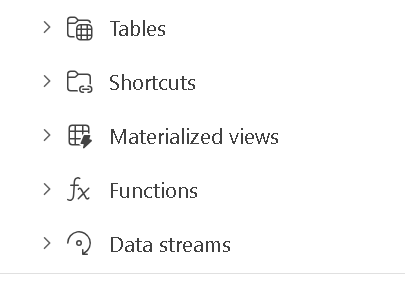 Figure 2: Eventhouse File Structure in Fabric Service
Here is the Fabric Idea if you’d like to vote for it.
Testing
When I realized that Eventhouse’s technology was over 10 years old, I was like surely someone has written about Unit Tests and Integration Tests. I found these posts:
- Eraneos: Azure Data Explorer CI/CD
- Microsoft Learn: An Approach to Unit Testing ADX Functions
- Writing System Tests Against ADX in .NET
I also came across Kusto Explorer and a docker container where testing could occur.
It’s very important that with Event Streams being the source of data feeding these Eventhouses, we test the transformations that occur in update policies. There seems to be sizable effort to build tests and structure your KQL to support testing. Update Policies must use Functions instead of raw queries, forcing the concept of Separation of Concerns. For example, let’s say I need to add a column to a bronze table based on some logic before having it moved to silver. The update policy could look like this:
.alter table SilverTable policy update
@'[{"Source": "BronzeTable", "Query": "BronzeTable | extend NewColumn = iff(Amount > 1000, \"High\", \"Low\")", "IsEnabled": true}]'
But to support testing it should look like this:
.create-or-alter function fnAddNewColumn() {
    BronzeTable
    | extend NewColumn = iff(Amount > 1000, "High", "Low")
}

.alter table SilverTable policy update
@'[{"Source": "BronzeTable", "Query": "fnAddNewColumn()", "IsEnabled": true}]'
And then the code could be tested like this:
////////////////////////////////////////////////////////////////////////////////
// Step 1: Clean up existing tables
.drop table BronzeTable ifexists
.drop table TestResults ifexists

////////////////////////////////////////////////////////////////////////////////
// Step 2: Create the source table
.create table BronzeTable (Name:string, Amount:int)

////////////////////////////////////////////////////////////////////////////////
// Step 3: Load sample data into BronzeTable
.ingest inline into table BronzeTable <|
Alice,500
Bob,2000

////////////////////////////////////////////////////////////////////////////////
// Step 4: Create a “pure-ish” function that reads BronzeTable
.create-or-alter function fnAddNewColumn() {
    BronzeTable
    | extend NewColumn = iff(Amount > 1000, "High", "Low")
}

////////////////////////////////////////////////////////////////////////////////
// Step 5: Create the test results table
.create table TestResults (TestName:string, Name:string, Expected:string)

////////////////////////////////////////////////////////////////////////////////
// Step 6: Ingest test assertions
.ingest inline into table TestResults <|
"Alice Amount Check","Alice","Low"
"Bob Amount Check","Bob","High"

////////////////////////////////////////////////////////////////////////////////
// Step 7: Run the tests and output TestName, Actual, Expected, Result
fnAddNewColumn
| join kind=inner TestResults on Name
| project TestName, Actual=NewColumn, Expected, Result=iif(NewColumn==Expected,"Pass","Fail")
Therefore the output looks like Figure 3.
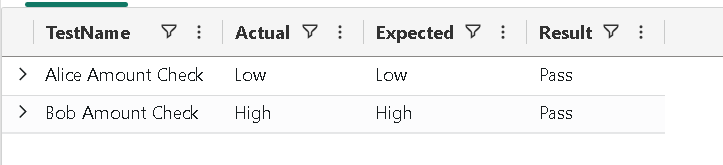 Figure 3: Test Results
But how do you run a bunch of these tests with a command line like “kql test” like “npm test”, like in the Javascript world? There is a dearth of libraries supporting KQL testing. I’ll be writing more about this, but if you know of a library, I am all ears.
Orchestration
I have been pleased with Event Streams and Eventhouse’s support with Deployment Pipelines, and I have been happy using Deployment Pipelines with the autobinding that occurs for deploying. Real-time Dashboards do need some work, however, with parameters. Autobinding does not always work and you’ll often get the issue below when deploying the dashboard, leading you to manually reset the parameter.
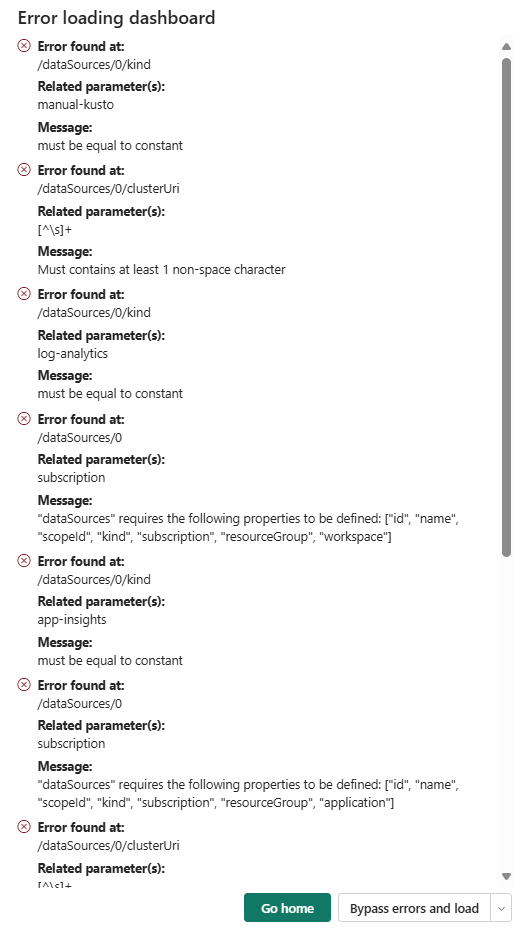 Figure 4: Common Deployment Error
That’s enough for now, and don’t think I am sour on Fabric Real-time. I find value in its capabilities, and I wouldn’t have come out with my series Making Your Power BI Teams More Analytic if I didn’t find value. I also see value in the Eventhouses built into the new monitoring feature in Fabric. If you’re not getting more familiar with real-time, I highly suggest doing so. I just want it to be better.
Did I miss something? Let me know your thoughts on LinkedIn or Twitter/X